
CASE/11 / Agriculture
United StatesPutting a vineyard's own data on the map
A Napa Valley vineyard already ran sensors, drone imagery and field surveys. We put that data on the map, scripted the repeatable steps and built rule-based logic to read it month by month.
01 / THE ASK
The decision behind the brief.
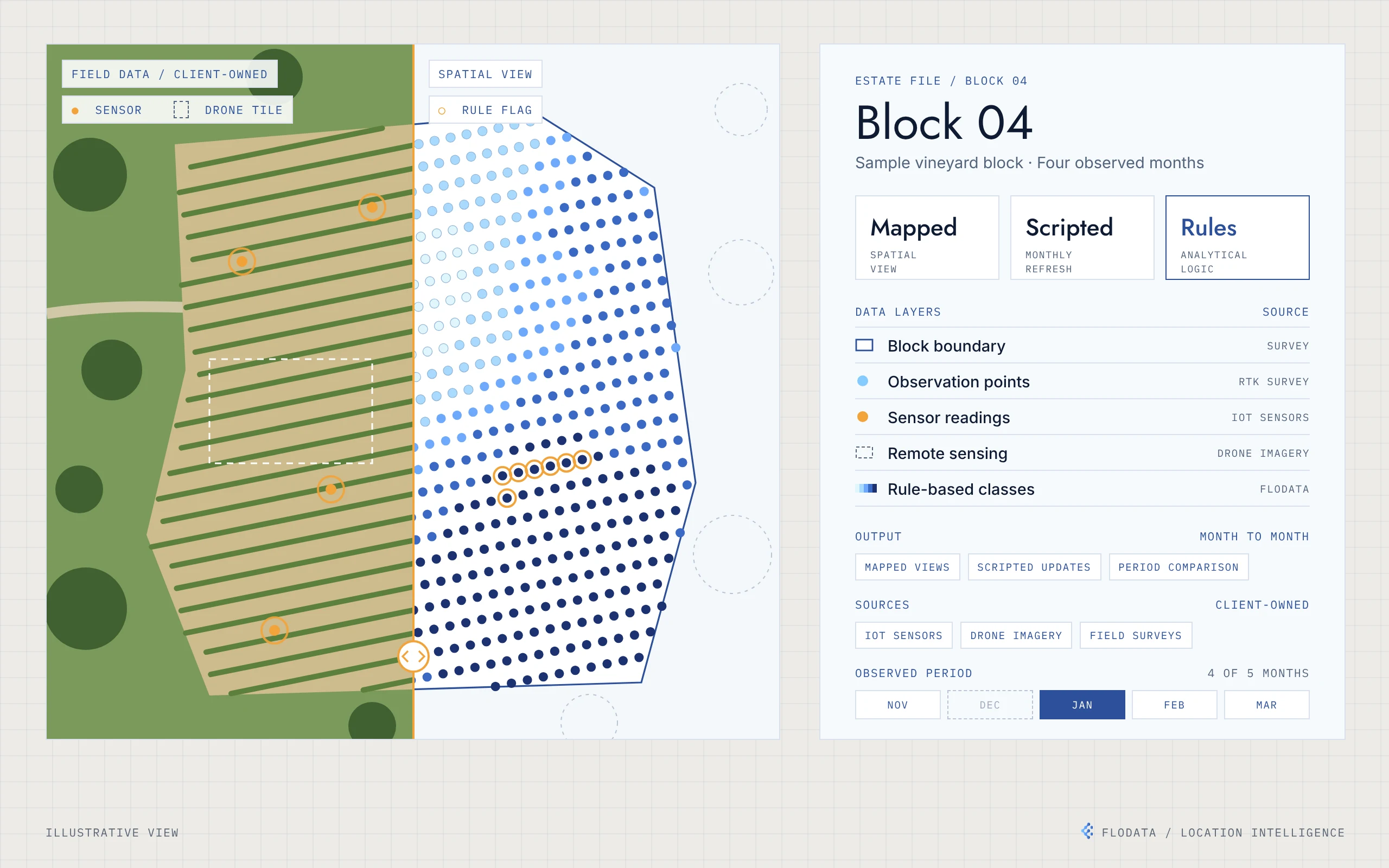
A vineyard owner in Napa Valley already ran an advanced setup. Field sensors recorded soil, weather and leaf conditions. Drone imagery covered the vines, and teams surveyed the blocks through the season. The data was there. What the owner wanted was a clear way to see it across the estate, and to compare it from one month to the next, without rebuilding the analysis by hand each time.
02 / WHAT WE FOUND
What the work revealed.
The data covered three families. IoT sensors measured soil moisture and pH, temperature, humidity, leaf wetness, rainfall and wind. Remote sensing added drone imagery, vegetation indices, elevation and slope. Manual surveys added RTK survey points, vine age and variety, pest observations and Brix readings. Each source arrived on its own schedule, some daily, some weekly and some once a season. A table can show what was measured. It cannot easily show where readings differ across a block, or how that pattern shifts over a season. The missing piece was location, not more data.
03 / WHAT WE BUILT
They had the data. We gave it a map.
Start from the client's data
We worked inside the existing setup. The client kept owning and running its sensors, drone flights and surveys. We did not install hardware or replace any system.
Organise every observation by location
Observations were tied to surveyed points inside mapped block boundaries, so every value has a place on the estate.
Script the repeatable steps
Automation scripts prepare each period's data the same way, so a new month can be mapped without starting again.
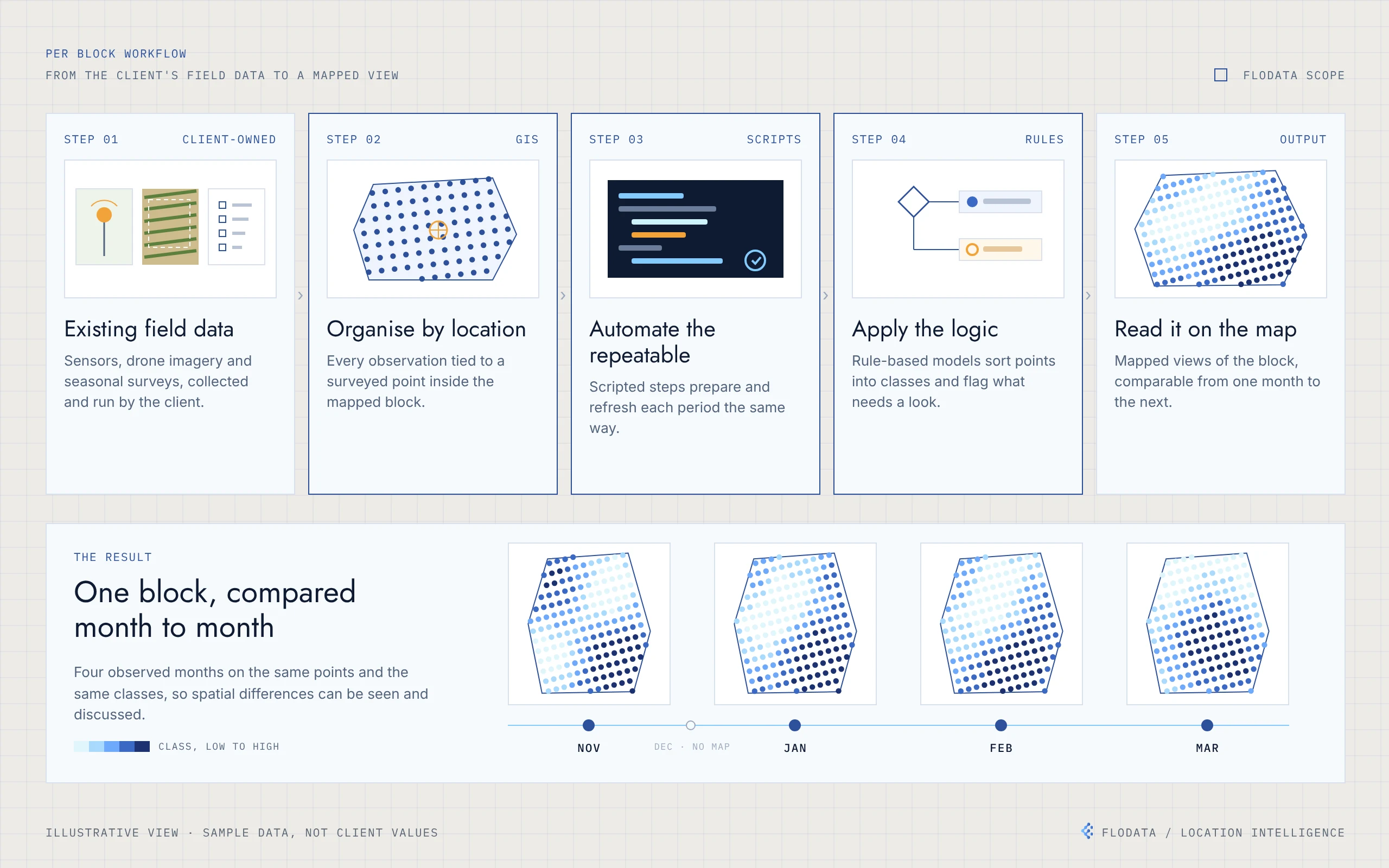
Five steps per block, from the client's field data to a mapped view. The same points and classes are applied to every observed month, so changes across the block can be compared.
Apply rule-based logic
Logic-based models sort observations into classes and flag the points that need a closer look.
Read it on the map
Mapped views show how values are distributed across the block, with each observed month on the same points and the same classes.
Compare the season
Maps for November, January, February and March sit side by side, so changes across the estate can be seen and discussed rather than inferred from tables.
04 / THE RESULT
One view of the estate, month by month.
The owner's existing data could now be read in place. Mapped views showed where conditions differed across each block. The four observed months could be compared on the same footing, and scripted steps meant each new period followed the same process. The client's systems stayed as they were. The engagement added the spatial and analytical layer on top of them.
05 / ENGINEERING DETAILUnder the hood
- Client field data
- Organise by location
- Scripted processing
- Rule-based logic
- Mapped views by month
Inputs (client-owned). IoT sensor data, including soil moisture and pH, temperature, humidity, leaf wetness, rainfall and wind speed. Remote sensing data, including drone imagery, vegetation indices, elevation and slope. Manual survey data, including RTK survey points, vine age and variety, pest observations, fertiliser use and Brix readings.
Spatial organisation. Observations are referenced to surveyed point locations within mapped block boundaries in a desktop GIS.
Automation. Scripts prepare and refresh each period's data for mapping.
Analytical logic. Rule-based models classify observations and flag points for review.
Outputs. Mapped views per block and per observed month, comparable across November, January, February and March.
- Desktop GIS mapping
- Python automation
- Rule-based classification
- RTK-referenced points
- IoT, drone and survey inputs