
CASE/05 / Sports & leisure
United StatesGolf course maps accurate enough to engrave
Machine learning georeferencing and scripted GIS digitisation cut the time and cost of turning golf courses into laser-engraving files.
01 / THE ASK
The decision behind the brief.
A US publisher of outdoor guidebooks and sporting maps sells customised laser-engraved maps of golf courses. Demand was growing and every order needed an accurate, detailed map of a specific course, delivered quickly. The publisher needed a partner who could turn courses into engraving-ready maps at volume without losing precision.
02 / WHAT WE FOUND
What the work revealed.
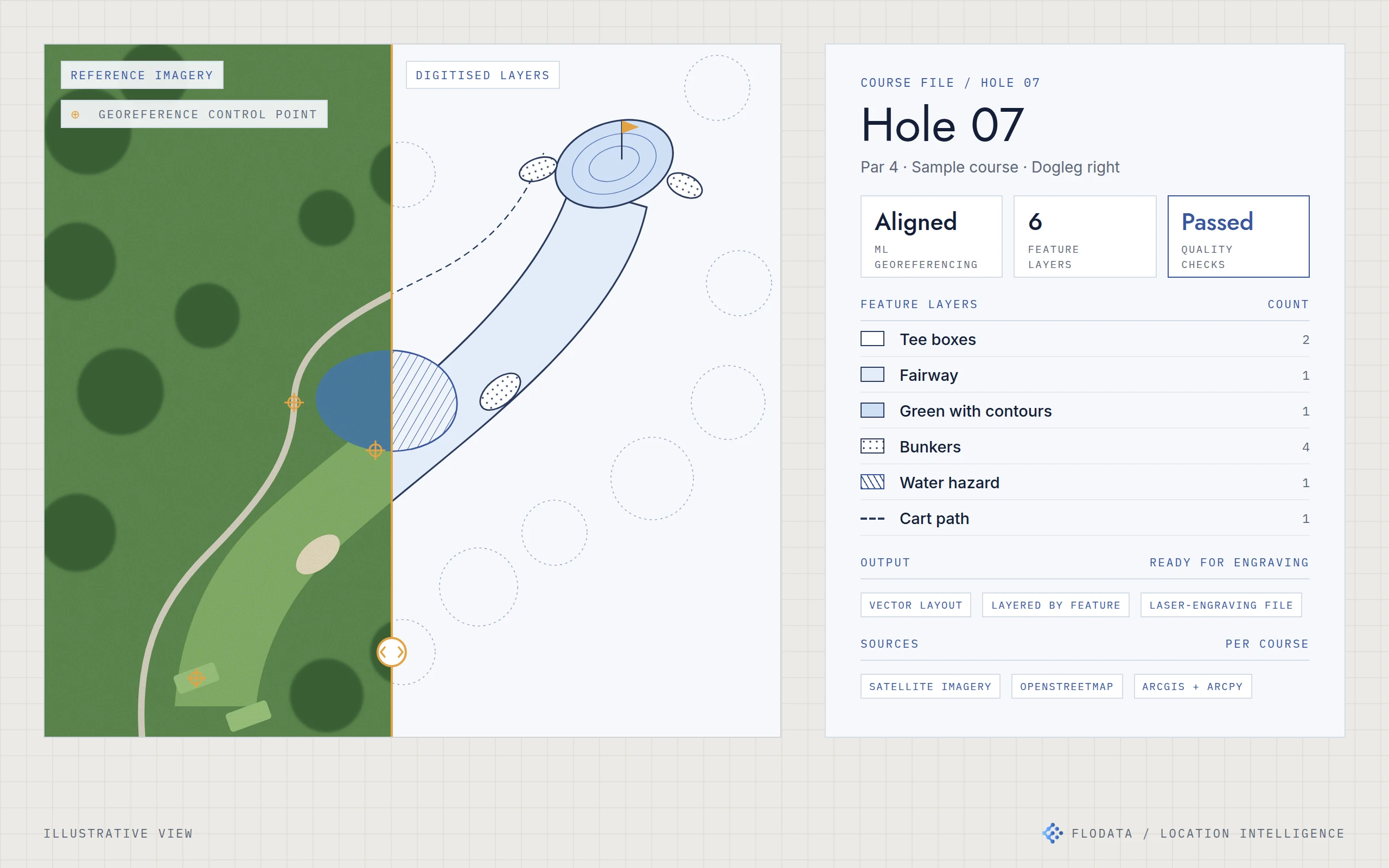
The reference images behind many existing maps were poor in quality or out of date, so features did not line up with the ground. A golf course is also harder to map than it looks. Bunker shapes, green contours, tee boxes, cart paths, fairways and water hazards all have to be right for the engraving to look like the course a golfer remembers. Doing this by hand was accurate but slow, and every hour of manual work went into the price of the map.
03 / WHAT WE BUILT
Align the imagery. Draw every feature. Script the rest.
Gather the inputs
For each course we combined high-resolution satellite imagery with OpenStreetMap data and the client's existing reference images.
Georeference with machine learning
We used machine learning models to georeference older reference images against features on the ground. Every layer drawn afterwards sits in the right place.
Digitise every feature
Tee boxes, fairways, greens, bunkers, water hazards and cart paths are digitised as separate layers in ArcGIS. Repetitive steps are scripted in Python and ArcPy.
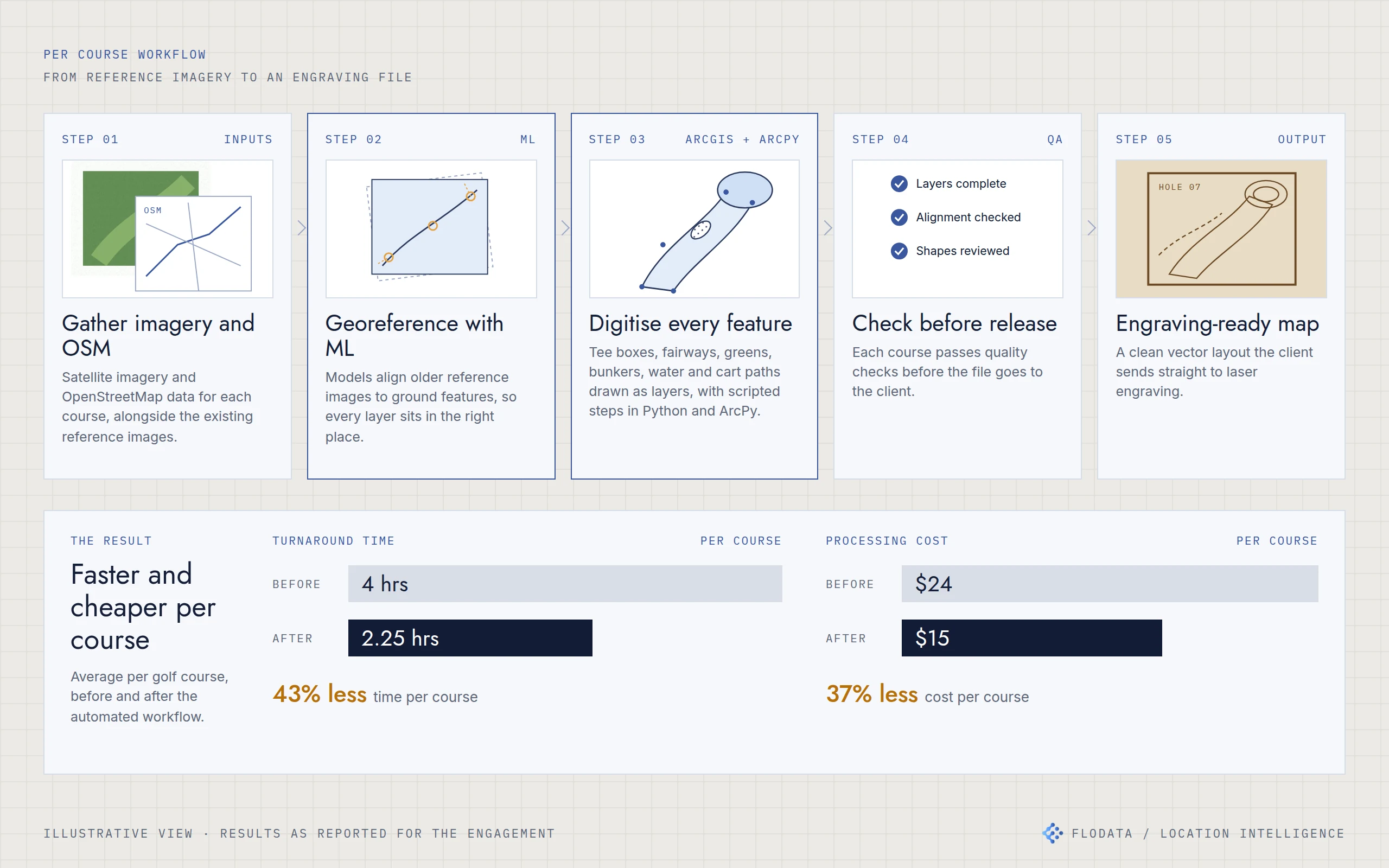
Five steps per course, from reference imagery to an engraving file. Average turnaround fell from 4 hours to 2.25 hours and processing cost from $24 to $15 per course.
Check before release
Every course passes quality checks on completeness, alignment and shape before the file goes to the client.
Deliver an engraving-ready file
The output is a clean vector layout, layered by feature, that the client sends straight to laser engraving.
Learn the game
Our team took golf lessons during the engagement. Knowing how a hole is played made it easier to judge which details a golfer would look for on the finished map.
04 / THE RESULT
Less time and less cost on every course.
Average turnaround per course fell from 4 hours to 2.25 hours, about 43% less. Average processing cost per course fell from $24 to $15, about 37% less. The savings outweighed the cost of building the automation. The workflow now supports a catalogue of [CONFIRM: over 20,000] golf courses worldwide.
“FloData Analytics has been incredible to work with, by far the most professional overseas partner we've had. Their expertise and quality of work are top-notch, and we fully trust their judgment.”
[CONFIRM: whether to run the quote at all]
05 / ENGINEERING DETAILUnder the hood
- Reference imagery and OSM
- ML georeferencing
- Feature digitisation in ArcGIS
- Quality checks
- Engraving-ready file
Inputs. High-resolution satellite imagery, OpenStreetMap data and the client's existing reference images, gathered per course.
Georeferencing. Machine learning models georeference older reference images to features on the ground before any digitisation starts.
Digitisation. ArcGIS for mapping and spatial analysis. Features are held as separate layers: tee boxes, fairways, greens with contours, bunkers, water hazards and cart paths. Python and ArcPy scripts automate the repetitive steps.
Workflow and storage. APIs connect the data sources and move each course through the workflow. Cloud storage holds the files for collaboration with the client.
Quality assurance. Each course is checked for completeness, alignment and shape before release.
- ML georeferencing
- ArcGIS and ArcPy
- Python automation
- OpenStreetMap and satellite imagery
- Feature-level QA